Posts

Showing posts with the label #pegatutorials

Pega Constellation Data Modeling: Step-by-Step Guide

Image
  How to Build a Customer Data Model in Pega Constellation (Step-by-Step Guide) FILES: Data model design Countries Catalog In this guide, we’ll walk through how to design and build a complete Customer Data Model in Pega Constellation . You’ll learn how to: Create data objects from scratch Establish relationships between objects (embedded and referenced data) Upload external catalogs (CSV) into Pega Visualize the full data model Reference the data model inside a case type This tutorial mirrors exactly what was built in the video—perfect for beginners learning Pega Constellation’s data model capabilities. 1. Designing the Data Model Before using App Studio, it’s important to outline the structure. Our Customer object will contain: Customer Fields Name Email Phone (list of phone records) Address (single address record) Products (list) Nationality (reference to a Country catalog) Supporting Data Objects To support the customer entity, we...

How to Create a Bank Application Using Pega Blueprint (Step-by-Step Guide)

Image
  How to Create a bank Application Using Pega Blueprint (Step-by-Step Guide) In this tutorial, we’ll walk through how to create a complete pay (KYC onboarding) application using Pega Blueprint , the new automation tool that allows you to generate case types, data models, personas, and application structure with minimal manual setup. Blueprint drastically reduces the time required to build an application from scratch, giving you a ready-to-customize foundation aligned with your business needs. 1. Accessing the Blueprint Dashboard To get started, navigate to: mega.com/blueprint/dashboard Log in with your account, and you’ll see the Blueprint dashboard. Click Create Blueprint to begin. 2. Selecting Templates and Application Context Blueprint provides a library of templates according to the industry and type of application you're building. Industry: Select Banking Click Next Sub-Industry: Choose Retail Banking Department: Select Onboarding New Customers Bl...

How to save a Page List into data type, Pega Tutorials

Image
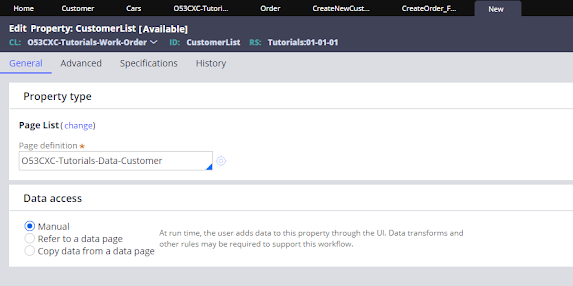
 Hi All, recently I had some troubles saving a list into a data type, that is something that I have never done before and there is so little information about it in the pega community sites, so let's get this done  to start you have to create a data type and have records on in, if you don't know how to do that, you can watch this video explaining step by step how to create a data type  https://youtu.be/rYex_UsTtMg  . The next thing that you will need is a page list property, when you are creating the page list property in page definition you have to add the class of the data type.  Once we create the page list the easy way to add records to it is through a table so on your section you can configure a table to configure a table select property on general than in order to add data, on table settings click on Operations and in row editing select inline and then click the row to edit and submit   save the section and test by adding some data to it, you wil...